The two main purposes of the ImAdjSoftCCD plugin is to integrate ImAdjSoft with CCDSoft and to allow scheduled imaging to take place within set time periods.
ImAdjSoftCCD - Options
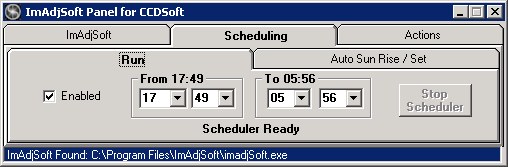
Enabled - If checked, the scheduler is enabled. Any images attempted from CCDSofts 'Take Image' tab will be routed through the scheduler for either main or guide camera. In order to disable scheduling and use the Take Image tab disrgarding scheduler settings, switch Enabled off.
From Hours, Minutes - This is the time in 24-hour format that Scheduled imaging will start. Select the start hour and minute from the dropdown boxes, or enter them directly. Any Options set for On Scheduled Start will be executed first.
To Hours, Minutes - This is the time in 24-hour format that Scheduled imaging will finish. Any Options set for On Scheduled End will be executed immediately after scheduled imaging finishes. At this point the plugin will enter the wait mode, until the scheduled start time arrives again, unless the Stop button is pressed.
Stop Scheduler - the scheduler is active only when the 'Take Image' button is pressed from CCDSoft's 'Take Image' tab. Scheduling can be stopped by pressing this button. If an image is currently in progress, you can either wait for it to finish, or stop it by pressing CCDSofts 'Abort' button on the 'Take Image' tab.
Status - The current status is shown as a single line beneath the Start and Stop times, in the example above, shown as "Scheduler Running". More detailed execution status are kept in the scrolling list at the bottom of the plugin interface. The current sequence of events can be scrolled through by clicking the small arrows at the right of this status line.