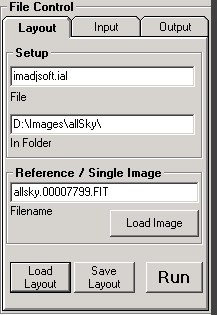
The File Control section has three tab panels for selecting file types and locations. Clicking a specific tab on the name will display it.
Layout - is for defining the layout name and location. The layout location is also used to define where the input files will be as the layout and input files need to be in the same directory.
Input - defines details about the input images. The type of files, how many to do and what to do with them after they have been processed.
Output- defines the output file name, format and the directory they will be saved in. Optionally, output can also be sent by FTP to any internet location via secure login.
Animation- Setup the automated creation of animations from processed images.