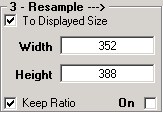
Resample
- The image can be resampled by entering a new size here..
To Displayed Size Check this box to resample the image to the size displayed. Usng this setting allows you to size the image onscreen using the Zoom keys then use that size to resample images to.
Width / Height in Pixels - These values can be explicitly entered. If Maintain Aspect is also checked, adjusting one value will automatically adjust the other to maintain the current aspect ratio.
On - Check On to turn on resampling using the current values. The displayed image will be updated and resampling will be enabled in the layout.