Transform
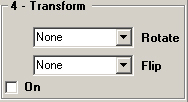
Allows you to Rotate and/or Flip the image.
Rotate - Select a Rotation type from the dropdown list. Valid values are:
- None - Apply no rotation.
- CW 90-degrees - Rotate Clockwise 90-degrees.
- CCW 90-degrees - Rotate Counter Clockwise 90-degrees.
- 180-degrees - Rotate 180-degrees.
Flip - Select a Flip type from the dropdown list. Valid values are:
- None - Apply no Flip.
- Horizontal - Flip the image Horizontally.
- Vertical - Flip the imge Vertically.
On - Check On to turn on Transformations using the current values. The displayed image will be updated and Transforms will be enabled in the layout.