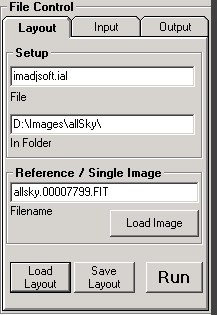
Filename
A layout must be named and saved, before processing is done.
The new layout name can be either entered directly into the layout Filename box, or the new layout can be saved from the File/Save As menu. ImAdjSoft will handle multiple layouts in the same directory, and will process them all. This can be useful for specific purposes, but if you don't have a reason to do this, then it is safer to ensure that only one ImAdjSoft layout exists in any directory.
Directory
This is the directory that the currently loaded layout was loaded from. It must be the same directory as the images you plan to process the images in,. When a reference image is loaded, this directory will default to the same path as the reference image. A directory can be selected and/or created by clicking the "Select" button to access the ImAdjSoft directory setup window.
Reference Image
A reference image is used to setup the processing sequence that will apply to images of the same type and will define the current layout. A reference image can be loaded by clicking the "Load Image" button. The loaded reference image will reflect the target images in size and orientation for the sequences to apply correctly to any further images processed with this layout.
Although it is called a reference image, this really only applies to setting up a processing sequence. You can perform processing on a single image, by loading it as the reference image, setting up your processing parameters and clicking the "Run" Button below the File Control Panel..